免费索取Ubuntu光盘的全程指导(适用于基本不懂英文的人)
本文写作时我刚申请,盘还没到,因此以下内容可能有误。
1,去launchpad开账户
1)https://launchpad.net/ ;
2)点右上角的 Log In / Register,进入注册页面。
3)最下面有个register按钮,上面有个文本框,在里面填你的email地址(有效地址,要通过email确认)。接着按register确定。
4)应该出现以下页面:
Done!
Your registration URL has been sent to . Once you have followed the link included in that email your Launchpad account will be activated.
Thanks for signing up and welcome to the Launchpad user community. We are always interested to hear new ideas and bug fixes, so please feel free to join #launchpad on irc.freenode.net and share your ideas for improvements to the Launchpad!
2确认账户
1/ 察看你的邮箱,应该有一封Launchpad Account Creation Instructions
2/ 打开它,内容如下:
Hello!
Thank you for registering at The Launchpad. To complete your
registration, please click on the link below and follow the
instructions to create your account:
https://launchpad.net/token/
The Launchpad is a web portal for open source developers that
includes easy web based translation and bug management. We'll
be adding new features to The Launchpad based on your
suggestions, so feel free to contact us on #launchpad on
irc.freenode.net with ideas. Malone and Rosetta are just
the tip of the iceberg
Thank you!
The Launchpad SWAT Team
launchpad@ubuntu.com
3,复制黑体部分的地址(原信中不是黑体)到浏览器的地址栏,回车
4,有五个文本框
第一个(Given Name)填你的名(拼音)
第2个(Family Name)填你的姓(拼音)
(注意这里的姓名也就是将来光盘收件人的姓名,请确保其真实有效)
第3个(Display Name (Required)).
最后两个是密码和确认密码。
5做完4以后,检查一下,接着按下面的add按钮。
完成后会跳出一个页面,一般来说,这代表你成功了。可以做下一步了。
3索要光盘
1,去https://shipit.ubuntu.com ;
第一个文本框填你注册launchpad时的填的email地址
第2个填你launchpad的密码
然后按下面的log in按钮
2出现的网页由三部分组成(有三个褐色的大标题)
1)第一部分(How many CDs would you like?)是说送几张光盘和送一张成本差不多。所以你想多要点没关系
2 (如果你需要的是x86 pc的光盘,这一步可跳过,如果你不知道x86,64-bit,mac,那么跳过这步) 第2部分(Request Details)选光盘
本部分第一个下拉框(Standard request),依次为
x86 pc 64-bit MAC(苹果电脑)
张数 5 0 0
1 1 1
10 3 2
20 3 2
Custom request不用管
3,第三部分(Shipping Address)
Organization不用填。
Address地址,这个最好找懂英文的帮你翻。不过既然送信的是中国邮递员,
直接把你的地址用拼音写应该就可以了。注意这里有两个文本框(第2个是确认地址)你的地址要写两遍。
City/Town/etc城市(区)
State/Province省(直辖市、自治区)
Postcode邮编
Country国家(选China)
Phone电话
检查一遍后按右下角的Request CDs按钮
祝贺,你终于完成了。
出现的页面上应该有一条黄底的New request accepted.
上传图片:
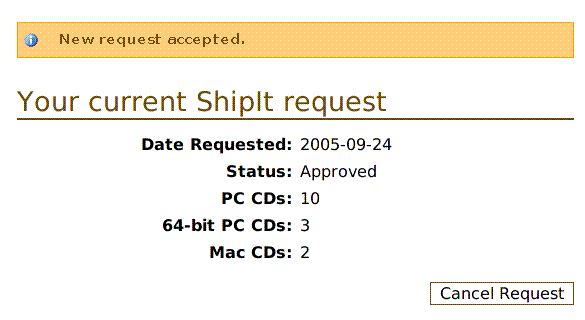
如果你看到了,就在家等着吧。
我照你做了,还是不行,怎么办?
1,别人申请了以后会分发的,你等一下就可以了。
2,我看到在淘宝上有卖(我不建议你去买,本论坛里有很多人乐意免费派送。)
3,你可以用站内短信联系我,提供一个有效的邮箱地址及密码(你可以去申请一个免费邮箱),以及你的需求(指标准发放中的一种,
定制发放不容易通过,且需要理由。)和收件人、地址、邮编、电话。如果我有空,我会试着帮你去申请。
但是请先自己尝试,如果人很多的话,我肯定没空的。
我也希望有申请过的人来帮助别人。如果你愿意帮助别人申请,请跟帖。这样如果有人按照本指南做了失败了,
他可以发站内短信给你。
|


 穆穆族论坛 » 拓 眼 电 脑 » [ 电脑网络 ] » 免费索取Ubuntu光盘的全程指导(适用于基本不懂英文的人)


 1: 1
1: 1 



 免费索取Ubuntu光盘的全程指导(适用于基本不懂英文的人) (